Documentation

Everything here reflects what the product actually does today. If something disagrees with the app, the app wins — and we'd like to hear about it: leads@hvacbuilder.app.

Getting started · Components · Solving · Annual simulation · Building simulation · Reports · Saving · AI assistant / MCP · Vendors & suppliers · FAQ

Getting started

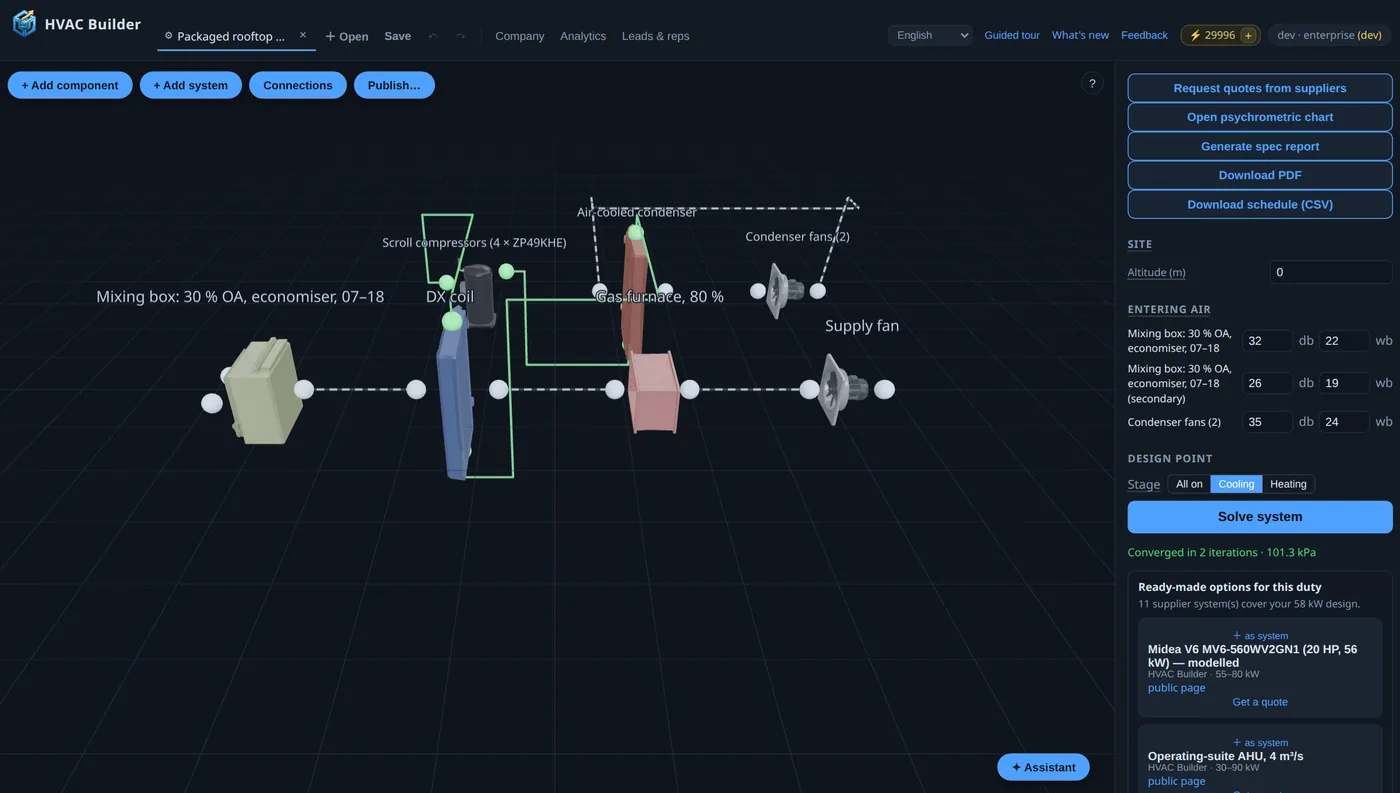
A system is a graph of components joined by typed ports. The 3D scene is a view of that graph — positions are cosmetic; only connections matter to the solver.

PlaceClick components in the left palette to drop them into the scene. Drag on the floor to arrange.
ConnectClick a port sphere, then a matching port on another component. Ports are typed — air (grey), water (blue), refrigerant (green) — and direction-checked; incompatible connections are refused.
Set boundariesEvery open air inlet needs entering air (dry-bulb / wet-bulb °C) in the right panel; open water inlets need a supply temperature. Altitude sets pressure.
SolveThe full thermodynamic balance: per-component states, duties, compressor operating point, totals. Non-convergence is reported as an error, never a silent partial result.

Fastest orientation: load an example (left panel), press Solve, then open the psychrometric chart. Every configuration field explains itself on hover (dotted underline).

The Design tab: components and solve controls on the left, the 3D scene with a wired DX circuit, per-component results

Component reference

ComponentPortsWhat it models
DX evaporatorair + refrigerantDirect-expansion cooling coil: ε-NTU with boiling refrigerant, dehumidification via bypass/ADP, dry-coil fallback at small duties.
Condenserair + refrigerantHeat rejection to an air stream (film condensation inside, air-side j-factor outside).
CompressorrefrigerantAHRI 540 / EN 12900 10-coefficient map in (evaporating, condensing) temperature, with superheat/subcool corrections. Pick a real model from the catalog or paste coefficients.
Water coilair + waterChilled/hot-water coil; the indirect stage of two-stage evaporative systems.
Wet packair + waterEvaporative media (published CelDek-family effectiveness). Water ports open → adiabatic; in a loop → cooling tower / spray stage.
FanairMoves the design flow; motor heat warms the stream by its heat-to-air fraction.
PumpwaterLoop circulation; power counts in totals.
HeaterairSelf-modulating duct heater holding a discharge setpoint; annual control steers it hourly.
Heat pipeair × 2Wrap-around precool/reheat pair; effectiveness calibrated to manufacturer selection data.
Sensible coreair × 2Air-to-air plate recovery; pick a real core (digitized manufacturer curves) or set your own effectiveness curve.
Pipe-in-pipe HXwater + refrigerantCoaxial exchanger — water-cooled condensing or chilled-water production.

Any topology the fluids allow is solvable: multi-loop water circuits, closed air recirculation, heat-pipe wraps around DX coils, water-cooled condensers. Design-flow mismatches between connected components are flagged as warnings after solving.

Solving & results

Results show convergence (iterations, pressure), per-component in/out air states, duties, compressor evaporating/condensing temperatures with capacity, power and COP, plus system totals (cooling, power, water use). The psychrometric chart overlays each component's process line. If a supplier's ready-made system covers your computed duty, it appears under the results with a one-click quote request.

The psychrometric chart overlay: evaporator and condenser process lines on the moist-air chart

Annual simulation

WeatherFetch a real typical meteorological year for 50 major cities (PVGIS © EU/JRC), generate a labeled synthetic design year, or import hourly CSV mapped by column names (an optional ghi irradiance column feeds solar gains in building runs).
ControlOptional load-following control: room setpoint, load model (base + slope × ΔT), automatic staging (ventilation → evaporative → mechanical; heating mode with a heater present), compressor modulation.
Run8,760 hourly solves in a few seconds. Dashboards: monthly energy/water, operating-mode hours, supply-temperature distribution, unmet hours.
RevisitCompleted runs are saved per account — reopen any dashboard from "Previous runs".

Annual runs cost 10 compute tokens per simulated year; point solves are free within your tier's monthly allowance, then cost 1 token each. Monthly token allowances by tier; top-ups (200 for $10) never expire.

Building simulation

The Buildings tab scales the analysis from one machine to a whole building. Draw rooms as blocks in a 3D scene and configure each: floor area and height, envelope conductance (UA), day/night internal gains, solar aperture (glazing × SHGC — multiplied by the weather's irradiance), and cooling/heating setpoints. Every field explains itself on hover.

AssignServe each room with one or several machines — your saved systems or published supplier systems, filterable by source; a shared room's load splits equally. Connect them by clicking ports in the scene, like the builder.
ConfigurePer machine: the supply outlet (auto-detected, or pick the component whose air outlet feeds the rooms) and a recirculating switch — the supply intake then breathes the rooms' return air instead of ambient, while condensers stay on the weather.
RunOne run solves every system against the weather year with full load-following control. Cost: 10 tokens per system per simulated year.
ReadPer-room comfort (unmet hours, min/max temperature, 2 °C temperature histograms, month × hour temperature carpets), per-machine sizing analytics (load-duration curves and peak cooling/heating day profiles against delivered capacity), per-system energy, and building totals. Previous building runs reopen from the right panel.
Buildings tab: room blocks and machines in the 3D scene, run controls on the left, previous runs on the right Building run results: per-machine load-duration curves and peak cooling/heating day profiles

Zone physics is a deliberately transparent 1R1C model: loads from envelope UA + gains against the setpoints, delivered capacity allocated proportionally to demand, and room temperatures that drift toward free-float when a system can't keep up.

Reports

One click generates a print-styled spec report: system schematic, component schedule, performance tables, psychrometric chart, and the annual section (monthly energy chart, mode share) when a simulation is attached. Download as PDF (rendered server-side) or open as HTML. Free-tier reports carry a watermark.

Saving & loading

"My systems" stores complete systems (graph + boundaries) per account — save, reload, delete. Saved annual runs keep their full results. Retention scales with tier.

AI assistant & MCP

In-app assistant: the ✦ Assistant button in the builder opens a chat that reads your current design, modifies it, solves it, and runs annual simulations — conversationally, in your language. Store your own Anthropic API key (assistant ⚙ → key settings) for unlimited chat billed to your Anthropic account, or use the platform key, metered through simulation tokens.

MCP connector: HVAC Builder is an MCP server. In Claude, add a custom connector with this URL — nothing to paste, sign in when it asks:

https://hvacbuilder.app/api/mcp

The connector registers itself, sends you here to approve it, and gets an access token scoped to your account. It works exactly as you do, with your tier's entitlements — and cannot approve further connections, change your plan, or reach admin tools. Disconnect it any time under avatar menu → Connections & API keys.

What it can reach: your saved systems, buildings and runs, the component and weather catalogs, and — if you are a supplier — your listings and RFQ leads. Tools that only read or compute are marked read-only, so a client can run them without asking each time; the three that write to your account (save_system, simulate_annual, import_catalog_items) only ever create, never edit or delete. See the privacy policy for what is stored and for how long.

Without OAuth — scripts, CI, or a client that only takes a token — create an API key (same menu) and send it as Authorization: Bearer hvb_…, or as ?key=hvb_… for connector UIs that only take a URL. Keys work on the whole REST API too.

Tools: list_component_kinds (schema + worked example), solve_system, simulate_annual, save_system, list_weather_datasets, list_supplier_presets — plus vendor tools below. Prompt requirements in plain language; the result lands in your account, ready to open in the builder.

Vendors & suppliers

Component vendors: register free in the app, publish compressors (AHRI 540 / EN 12900 maps) and coils, tag your markets. Engineers select your items in their designs; you get selection analytics and RFQ leads by email. Bulk onboarding via MCP: fit_compressor_map turns published performance tables into coefficients, import_catalog_items loads up to 100 items per call, my_leads lists your RFQs. See the vendor page.

System suppliers: publish complete branded systems from the builder — gallery placement, duty-matched suggestions under engineers' results, and a public spec page per system with live-solved performance. See the supplier page.

The supplier portal: component listings, system offerings, analytics, and leads

Importing your own data

Two CSV imports exist, both mapped by column name rather than position, and both with a sample you can download and open:

weather-sample.csv An hourly weather year. One row per hour (8 760 for a full year) with a header row. Dry bulb °C is required; add wet bulb °C or relative humidity %. Timestamp is optional, and a solar column (GHI, W/m²) feeds solar gains in building simulation. After upload you pick which of your columns is which — the names in the sample are only a suggestion.
loads-sample.csv Hourly room loads for load-following control, when you would rather supply them than have them derived from outdoor temperature. Cooling kW in the first column, optional heating kW in the second; a header row is skipped automatically.

Where the numbers come from

Nothing in HVAC Builder is a proprietary correlation. Every relation the solver uses is published, and these are the publications — follow them if you want to check a number rather than take ours.

ASHRAE Handbook — Fundamentalsmoist-air psychrometrics and the air-side heat-transfer relations
IAPWS-IF97the water/steam saturation line and liquid-water properties
AHRI Standard 540the 10-coefficient compressor performance maps the catalog carries
EnergyPlus Engineering Referenceevaporative-media saturation effectiveness and the frost/defrost derating
CoolProprefrigerant properties when the shared library is present
PVGIS (European Commission, JRC)the measured typical meteorological years behind every weather-driven run

Component data itself comes from the catalog: manufacturer-published figures where a supplier has listed them, generic or clearly-labelled synthetic entries otherwise. A listing's certification badge is the supplier's own claim unless it is marked verified.

FAQ

Are results certified?No — they're engineering estimates from catalog data and published correlations. Catalog entries marked "EN 12900" use manufacturer-published data, unverified by the manufacturer unless claimed.
Units?SI throughout: °C, kPa, kW, m³/s, kg/s, l/h.
Languages?English, Deutsch, Français, Español, Italiano, Polski, Nederlands, Svenska, Norsk, Suomi, 中文, 日本語 — picker in the top bar.
Billing?Prices in USD (see pricing); checkout can present your local currency. Cancel anytime; your saved systems are kept on downgrade.
Refrigerants?All CoolProp fluids including zeotropic blends (R448A-class); validated curve-fit fallback for R410A.
HVAC Builder · engineering results are estimates from catalog data and published correlations: ASHRAE, IAPWS-IF97, AHRI 540, EnergyPlus, CoolProp · weather data: PVGIS © European Union, JRC · contact: leads@hvacbuilder.app · bugs: bugs@hvacbuilder.app · Privacy